Friday, May 2, 2008

OAIster union catalog of digital resources


OAIster (The OAI stands for Open Archives Initiative, which also refers to their metadate collection protocol.) is a search engine that utilizes data harvesting software to find internet resources - specifically to harvest metadate from digital collections all over the world. OAIster, while not directly connected to the Open Access movement, certainly supports similar principles. Currently, OAIster can only access something like 15,622,344 records from 950 separate contributors. While they may not realistically be able to compete with giant for-profit search engines, that as never their ultimate goal, and they're certainly a useful resource.
OAIster as originally the result of a Mellon grant given to the University of Illinois at Urbana - Champagne. The grants as specifically "to establish a broad, generic retrieval service for information about publicly available digital library resources provided by the research library community." Ultimately they've succeeded admirably, making them the best attempt at comprehensive digital reference I've seen, not counting the dubious charms of Wikipedia. Right now OAISter can find not only digitized and digital created texts, but also images, sound, and videos. OAIster's mission is to eliminate dead and useless links and to be a comprehensive academically oriented digital research one stop.
Currently the only problem with this is the software itself. The search functionality will be familiar to anyone who's ever tried to use an online reference library, but typing in a search word or phrase with high numbers of search results will hang the system for minutes at a time, at least on my laptop.
The only other problem I have with OAIster is similarly of execution, not intent. OAIster is very much oriented toward the academic. The problem
is in the gap between free and restricted access materials. OAIster makes no bones about their desire to make public all records regardless to their restriction with in the resource from which they were harvested. They point out in their collection policy that to filter resources usually requires a lot of extra effort on their part, and thus the burden of marking those falls to their contributors, not them.

Thursday, May 1, 2008

Seattle Public LIbrary

The Seattle Public Library home page has a lot going on, but it's clean and neatly organized. I decided to focus on their offerings for teens.

It has the same style layout, but slightly brighter colors. They include a recommended reading list for a teen librarian, and announcements about upcoming events -- the all ages art show (also advertised on the library's home page) and a series of writing workshops for teens.

They also have a teen podcast, created by teens; the SPL has a Teen Center Advisory Board comprised of actual teenagers, who create the podcasts. They have links to subscribe to the podcasts via RSS or through iTunes (or to download them straight from the site), which shows a pretty good grasp of technology.

Through tutor.com, the library offers homework help (just need your library card to use it), as well as offering a list of recommended databases.

They do offer a review form for teens, where they can write reviews of books of up to 750 words and submit them to the site. However, I couldn't find any place to read the reviews submitted. The catalog links to reviews of the book (including Amazon and LibraryThing reviews), which is a really neat resource, but what about reviews by SPL teen users?

The SPL offers extensive reading lists divided into lots of categories (including vampires!), but the divide between "realistic fiction for girls" and "realistic fiction for guys" irritated me. I know that statistically, guys are more interested in reading about other guys, but labeling a book "for girls" isn't going to encourage them to try something new, I don't think. There's no overlap between the lists, but the guy's list does include several female authors (and both lists include some books I really love).

Overall, I think the Seattle Public Library has created a really great teen section, with a lot of relevant and interesting information that would make the library seem like a useful, fun place for teens to go.

Toledo-Lucas County Public Library Children's Catalog

I wanted to look at a kids’ OPAC and settled on the one used by the Toledo-Lucas Public Library in Ohio. The catalog is powered by AquaBrowser Library, a search tool created by Medialab Solutions. Steph talked about some of the benefits of AquaBrowser in one of her posts (4/23/08) and it is an interesting interface I have only recently encountered.


Toledo uses bright colors and graphics to differentiate between its regular OPAC and the one geared toward children, as many public libraries do. I was surprised by the lack of buttons with graphics that are found on most interfaces designed for kids. In fact, while the catalog is appealing at first glance, it lacks oomph and kid appeal. I find the fonts too small and difficult to read for any age level and would have expected more attention to be paid to the usability for the wide age range usually targeted for such specialized OPACs. There are no fun and useful links to popular databases or reference sites, no book lists or links to the main children’s page. In fact, going “Home” takes you back to the main Toledo Public Library page rather than to the Kids Place, an internal library page where you can find all the Homework Help and Events information you would expect to be featured anywhere kids might browse.

It is surprising that the Toledo kids’ main catalog page consists only of a search bar. Such minimalist interfaces are great for, say, Google, but one expects a bit more prompting from a catalog designed around the needs of younger users.

A useful concession to the audience’s tendency to misspell is the availability of suggested spellings found in a word cloud once a query is entered. I looked for E.L Konigsburg, author of such beloved children’s classics as From the Mixed-Up Files of Mrs. Basil E. Frankweiler and The View from Saturday. Hers is a difficult last name to spell and various creative misspellings prompted the suggestion of the correct formation.


Suggested spellings in a similar format are available on the library’s enhanced OPAC for all users, but it is more streamlined, that is, there are fewer false positives producing results, in the children’s version.

A word cloud can also be generated according to a search term’s word associations or suggested interests. I did a search for “orphans” to see what would emerge:


Some of the suggested terms seem immediately useful: one can find books about orphans that are also mysteries or that also concern friendship. “Baudelaire” comes up as well, an allusion to the popular Lemony Snicket series.

The rightmost part of the screen allows for refinement by format (book, audio, etc.), author, subject, series, and language. This is all very useful information that could be arranged more attractively for the intended audience.

In short, the AquaBrowser OPAC, as exemplified in the Toledo children’s catalog, has potential but needs refinement. Stronger graphical elements, easier legibility and navigability and an integration of the catalog with other library offerings would be a step in the right direction.

Facebook, the response, with qualifications

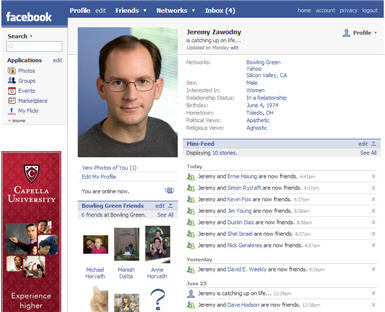
In response to Doug’s great facebook post, I thought I’d hash out some of my ideas on the subject. One of the reasons I like facebook is its superficiality; I get many of the rewards of staying in touch with people, but I have to give little in the way of communication or commitment. It formalizes empty social gestures that I require as a busy, semi-anti-social yet still social animal, and makes them virtual enough to be bearable. Yes—the ultra poke features can be annoying, but the fact that there is a fun and creative way to say “hi” without actually engaging or inconveniencing someone is something I cherish. Also, facebook has done wonders for dating. Too shy or cowardly to send a message? Facebook, because it’s full of slight communicative gestures that teeter on meaning nothing, supplies us with tiny bits of romantic currency (small tokens of affection) for those who fear anteing up too soon or at all. Befriend, poke, tag your crush in a picture--all are safe measures that don't reveal your intentions.


But while facebook is great at letting us stay friends with people we barely want to be friendly with, it is terrible at distinguishing between types of friends. Of course, broadcasting friend “levels” to the parties involved would be absurd and even hurtful, but letting the user set what information (profile lists, party RSVPS, relationship status) goes out to what types of friends—with those recipients being none the wiser—seems like a route facebook should go in the future. One-size (or in this case, two: public and private profiles) fits-all-profiles are sadly limited. For example, I want my boss as a friend, but not the kind of friend who gets to see my weekend pictures.

For such a feature to be useful, though, I guess it would have to be semi-automated or initiated by system generated defaults That is, would users even know what bins of friends to create? Would they bother sorting through all of them? Maybe it could start as a “these 6 people are my “work” friends, so they should never see my pictures” kind of deal. Or facebook could guess, and the user could approve? I’m sure some people are thinking that an outside application could do this, but that can’t be the case, for it would have to utilize too much extant garden (if Doug’s walled-in garden metaphor is still apt) functionality, such as security settings--stuff which wouldnt be opened up to a developer.


But back to public personas--as you mention in your discussion of list-making, the way in which you choose to represent yourself is quite important. Even our unintentional signals connect us in interesting ways. Such as an ironic misspelling of a movie title linking two sarcastic types ( I actually can't think of an example here). Indeed, the social utility of facebook might decrease if it gave users much choice in the matter. But more on the topic of list-making. The lists can be interesting, if really pretentious, but they obviously lack any authority file of sorts: if enough users wrote “brothers Karamazov” in their profiles, why can’t one of those involuntary pull down tabs emerge to tells users what everyone else put in their profile (brothers mcmullen, o brother where art thou) or at least to tell them how to spell it right?

UCSB's Cylinder Preservation and Digitization Project

In addition to its soon-to-be-unveiled Victor Project (an online discographical database of pre-1950 Victor and RCA label recordings with audio samples, digital images, and advanced search functionality), the University of California at Santa Barbara’s Department of Special Collections has launched some really fabulous online projects with its audio collections in recent years.

First and foremost is the Cylinder Preservation and Digitization Project, a digital collection of nearly 8,000 cylinder recordings. (First mass-produced in the mid-1880s and manufactured well into the 1920s, wax cylinders are the earliest commercial sound recordings.)

The project began in January 2002 as a pilot program for digitizing and creating access to the department’s cylinder recording collection. Its scope was expanded with a major IMLS grant in 2005, and, in 2006 (I believe) it went online. Cylinders continue to be added incrementally as they are digitized. All are freely downloadable or streamable online.

The collection of spoken and musical selections is searchable by keyword, author, title, year, subject, and UCSB Call Number. However, unless one has a knowledge of obscure 19th century wax recordings, the site’s browse feature is perhaps more useful to the researcher, music fan, or cultural historian. The collection is browseable by Ethnic or Foreign Cylinder, Instrument, Topical Subject, and Genre.

For instance, browsing by “banjo” (under instruments) returns a list of 92 such examples from the Department’s collection. Clicking on Vess L. Ossman’s “Cloud Chief,” takes the user to a catalog record where one can listen to (and download) a particular selection as either an MP3 (digitally restored) or a wav (not restored).

The site's overall functionality isn’t necessarily that sophisticated. It works clearly and effectively, however, unencumbered with unnecessary linkage.

Interestingly, there is something of a disclaimer on the site about copyright, one of audio archiving’s traditional albatrosses. The disclaimer concludes only that there is still a great deal of ambiguity, if not tenuousness, in the initiative’s legal clearance:

“All Edison cylinders are presumed to be in the public domain as the assets of Edison Records were transferred to the National Park Service, a federal agency. Other American sound recordings made prior 1972 may or may not be protected by state laws or common-law copyright… The nature of the various state laws and differing interpretations of these laws in state courts means that the legal status of many early recordings is unclear.”

Regardless, the transfers are licensed for public use under a Creative Commons Attribution-Noncommercial 2.5 License, and users are encouraged to redistribute, reissue, mash-up, or re-mix the transfers.

All catalog records are searchable through the website, as well as through the UCSB Library catalog and the University of California system-wide catalog. The site also has streaming radio programs of its collections and a "featured cylinder" section showcasing some of the most interesting items in the collection.

This is one of the most innovative online projects initiated by an audio archiving institution. To be fair, there aren’t many such projects involving commercial recordings afoot; they tend to be hampered by a lack of funding and, moreover, by restrictive and complicated copyright law.